Git
Git是一个分布式版本控制系统(VCS),最初由林纳斯·托瓦兹创作,于2005年以GPL许可协议发布。
基础
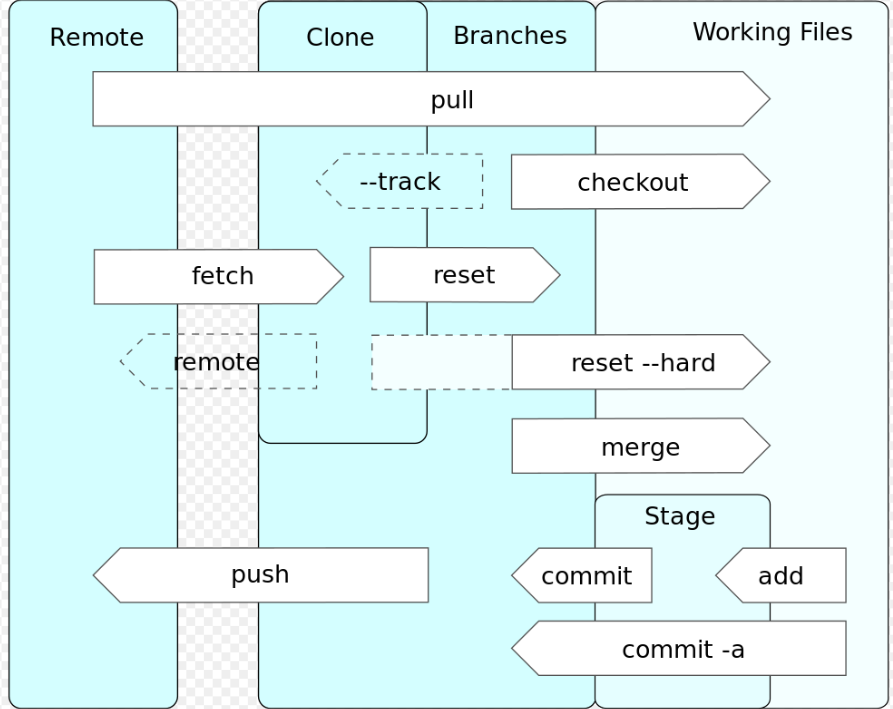
安装
1
2
| apt install git-all -y
git --version
|
其他方式 https://git-scm.com/downloads
git config --> 配置git
/etc/gitconfig 系统配置, --system选项~/.gitconfig 或 ~/.config/git/config 用户配置 --global, 对所有仓库生效- git库中
.git/config --local 默认 , 对当前仓库有效
下一级别会覆盖上一级别.
1
2
3
4
5
6
7
8
9
10
11
12
13
14
15
16
17
18
19
20
21
22
23
24
25
26
27
28
29
30
31
32
33
34
35
36
|
git config --global user.name 'cyka'
git config --global user.email 'cyka@qq.com'
git config --global core.editor emacs
git config --global core.editor "'C:/ProgramFiles/Notepad++/notepad++.exe' -multiInst -notabbar -nosession -noPlugin"
git config --global http.proxy socks5://169.254.5.18:10808
git config --global https.proxy socks5://169.254.5.18:10808
git config --global http.proxy http://169.254.5.18:10809
git config --global https.proxy http://169.254.5.18:10809
git config --global http.https://github.com.proxy socks5://169.254.5.18:10808
git config --global http.https://github.com.proxy http://169.254.5.18:10809
git config --list
git config --show-origin <user.name>
git config --global --unset <http.proxy>
git config --global alias.last 'log -1 HEAD'
git config --global alias.visual '!gitk'
|
获取帮助
1
2
3
4
| git help <verb>
git <verb> --help
git <verb> -h
man git-<verb>
|
git init --> 初始化仓库
1
2
3
4
| cd myrepo
git init
git init -b main
|
git add --> 暂存文件
git status --> 仓库状态
查看分支, 提交, 文件状态
1
2
3
| git status [file]
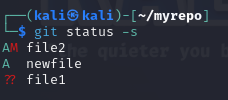
git status -s
|
新添加的未跟踪文件前面有 ?? 标记
新添加到暂存区中的文件前面有 A 标记
修改过的文件前面有 M 标记。
待解决的conflicts 有UU标记
输出中有两栏,左栏指明了暂存区的状态,右栏指明了工作区的状态。
git clone --> 克隆仓库
1
| git clone <url> [newName] [-o <originName>]
|
git 支持多协议 https, git, ssh(git clone user@server:path/to/repo.git)
.gitignore --> 忽略文件
定义不使用git管理的文件, 使用标准的glob模式匹配(简化了的正则表达式), 递归应用整个工作区.
[abc] 匹配任意一个括号中的字符* 匹配任意多个? 比配任意单个字符[0-9] 匹配两个字符之间a/**/z 匹配任意中间! 取反
1
2
3
4
5
6
7
8
9
10
11
| # 忽略.o 或 .a 结尾文件
*.[oa]
# 忽略~结尾文件
*~
# /开头防止递归
/*log
# 忽略doc中的.pdf 文件
doc/**/*.pdf
|
.gitignore 文件列表 https://github.com/github/gitignore
git diff --> 查看改动
1
2
3
4
5
6
|
git diff <file>
git diff --statge <file>
git diff --cached <file>
|
diff 插件
git commit --> 提交至本地仓库
1
2
3
4
5
6
|
git commit
git commit -m 'update'
git commit -a -m 'new feature'
|
git rm --> 移除文件
和直接用命令删除的区别是:
直接删除需要git add提交到暂存区 然后 git commit 完成删除
而 git rm 则会将delete的信息放入暂存区, 可以直接提交
1
2
3
| git rm <file>
git rm -r log/\*.log
|
git mv --> 移动文件
git log --> 查看提交历史
1
2
3
4
5
6
7
8
9
10
11
12
| git log [origin]/[branch]
git log -p 3
git log --stat
git log --oneline
git log --pretty=full
git log --pertty=format:'%h ==> %an %ad %s' --graph
git log --since=2.weeks
git log --grep 'xxx'
|
git reset --> 取消暂存
git checkout --> 工作区文件恢复为暂存区文件
远程仓库
git remote --> 控制远程仓库
1
2
3
4
5
6
7
8
9
10
11
12
|
git remote
git remote -v
git remote show <remote>
git ls-remote
git remote add <shortname> <url>
git remote remove <shortname>
git remote rename <shortname> <newName>
|
git fetch --> 更新本地远程分支
git fetch命令只会从远程仓库获取最新的提交,但不会自动合并到当前分支。它将更新远程分支的引用,可以通过git merge或git rebase命令将远程分支合并到当前分支。
1
2
| git fetch <remote> [branch]:[newBranch]
git fetch --all
|
git pull --> 拉取合并分支
git pull命令是git fetch和git merge的组合。它会从远程仓库获取最新的提交,并将它们合并到当前分支。如果有冲突,需要手动解决冲突。
1
| git pull <remote> <branch>
|
git push --> 推送到远程仓库
1
2
3
4
5
| git push
git push [remote] [<local_branch>:<remote_branch>]
git push <remote> --delete <branch>
|
git tag --> 设置标签
给提交打上标签
1
2
3
4
5
6
7
8
9
10
11
12
13
14
15
16
17
18
19
20
21
22
23
24
25
|
git tag
git tag -l 'v1.3.1*'
git show v1.3.1a
git tag -a 'v1.1.1' -m 'my version 1.1.1'
git tag 'v0.1'
git tag -a v0.1 9ed235f
git push [remote] [branch] <tagname>
git push [remote] [branch] --tags
git tag -d 'v0.1'
git push 'origin' --delete <tagname>
git push 'origin' :refs/tags/<tagname>
|
分支
git branch --> 分支操作
1
2
3
4
5
6
7
8
9
10
11
12
13
14
15
16
17
18
19
20
|
git branch
git branch -a
git branch -v
git branch -vv
git branch --no-merged [branch]
git branch <branchName>
git branch -d <branchName>
git branch -D <branchName>
git log --decorate
git log --oneline --decorate --graph --all
|
1
2
3
4
|
git branch -u/--set-upstream-to <origin/branch>
git branch --unset-upstream <branch>
|
git checkout --> 切换分支
1
2
3
4
5
6
|
git checkout <branchName>
git checkout -b <branchName>
git checkout -b <branchName> <origin/branchName>
|
1
2
3
4
5
|
git fetch
git checkout --track origin/<newbranchName>
git checkout <newBranchName>
|
git merge --> 合并分支
1
2
3
| git merge <branchName>
git mergetool --tool=<toolName>
|
git reset --> 回滚并删除合并提交
git revert --> 取消合并提交并创建新的提交
1
2
| git revert -m 1 HEAD
git revert -m 1 [合并提交的哈希值]
|
git rebase --> 变基
设置基底分支, 将一个分支的提交移动到另一个分支的顶部
1
2
3
4
5
| git rebase <baseBranch>
git rebase --onto <mainBranch> <subBranch> <subsubBranch>
git pull --rebase
|
Git Large File Storage (Git LFS)
LFS支持最大2G大小的单个文件, git理论是没有传输大小限制的, 不过github有限制最大100M的单个文件.
1
2
3
4
5
6
7
8
9
10
11
12
|
git lfs install
git lfs track "*.mp4"
git add .gitattributes
git add path/to/large/file.mp4
git commit -m "Add large file to LFS"
git push origin master
git lfs untrack "*.mp4"
git lfs uninstall
|
其他
参考
- Pro git
- github文档
- [Git版本控制管理(第2版)]
- [Git团队协作]
- Generating a new SSH key and adding it to the ssh-agent
- 在Linux配置Git SSH的详细步骤
