安装系统
下载openEuler-20.03-LTS
验下完整性
成功登录
nmtui 配置下网络
1 yum clean all && yum makecache
安装桌面
1
2
3
4
5
6
7
yum install ukui -y yum groupinstall fonts -y systemctl get-default systemctl set-default graphical.target systemctl get-default reboot
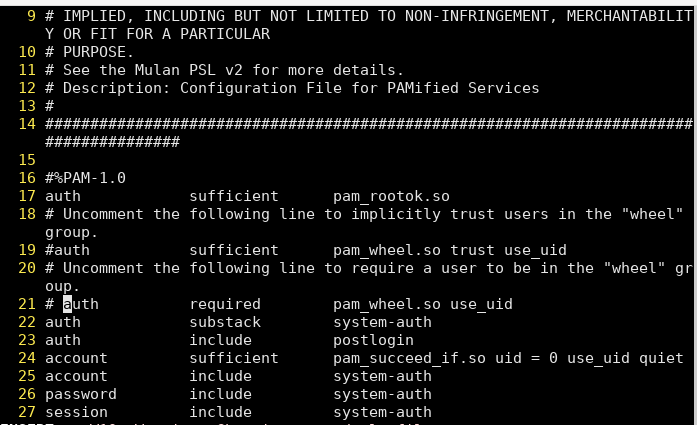
解决su 无法切换root 用户
注释 21 行
内核实验
实验一 内核模快编程入门
1
2
3
4
5
6
7
8
9
10
11
12
ifneq ($(KERNELRELEASE) ,) obj-m := helloworld.o else KERNELDIR =/lib/modules/$(shell uname -r) /build PWD = $(shell pwd) default:
(MAKE) -C
(KERNELDIR) M=$(PWD) modules endif .PHONY :cleanclean: -rm *.mod.c *.o *.order *.symvers *.ko
: hello_world.c 1 2 3 4 5 6 7 8 9 10 11 12 13 14 #include <linux/module.h> MODULE_LICENSE("GPL" ); int __init hello_init (void ) { printk("hello init\n" ); printk("hello,world!\n" ); return 0 ; } void __exit hello_exit (void ) { printk("hello exit\n" ); } module_init(hello_init); module_exit(hello_exit);
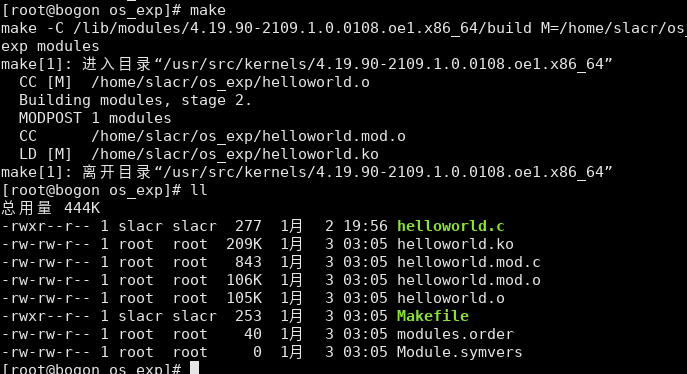
编译模块
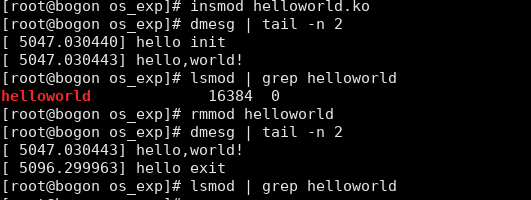
进行模块加载, 查看, 卸载
实验二 内存管理
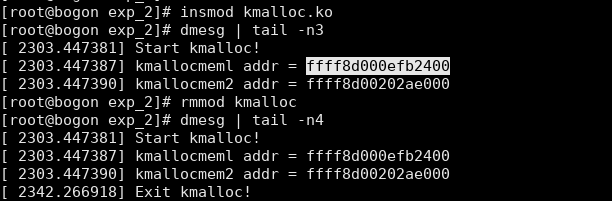
使用 kmalloc 分配 1KB,8KB 的内存,打印指针地址
: kmalloc.c 1 2 3 4 5 6 7 8 9 10 11 12 13 14 15 16 17 18 19 20 21 22 23 24 25 26 27 28 29 30 31 32 #include <linux/module.h> #include <linux/slab.h> MODULE LICENSE ("GPL" ) ; unsigned char *kmallocmem1;unsigned char *kmallocmem2;static int __init mem_module_init (void ) { printk("Start kmalloc!\n" ); kmallocmem1 = (unsigned char *)kmalloc(1024 , GFP_KERNEL); if (kmallocmem1 != NULL ) { printk(KERN_ALERT "kmallocmeml addr = %lx\n" , (unsigned long )kmallocmem1); }else { printk("Failed to allocate kmallocmem1!\n" ); } kmallocmem2 = (unsigned char *)kmalloc(8192 , GFP_KERNEL); if (kmallocmem2 != NULL ) { printk(KERN_ALERT "kmallocmem2 addr = %lx\n" , (unsigned long )kmallocmem1); } else { printk("Failed to allocate kmallocmem2!\n" ); } return 0 ; } static void __exit mem_module_exit (void ) { kfree(kmallocmem1); kfree(kmallocmem2); printk("Exit kmalloc!\n" ); } module_init(mem_module_init); module_exit(mem_module_exit);
1 2 3 4 5 6 7 obj-m += kmalloc.o all: make -C /lib/modules/
(shell uname -r)/build M=
(PWD) modules clean: make -C /lib/modules/
(shell uname -r)/build M=
(PWD) clean
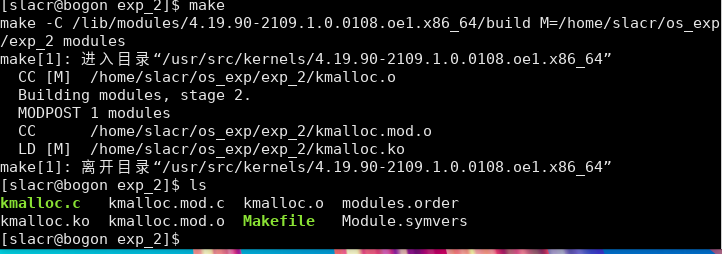
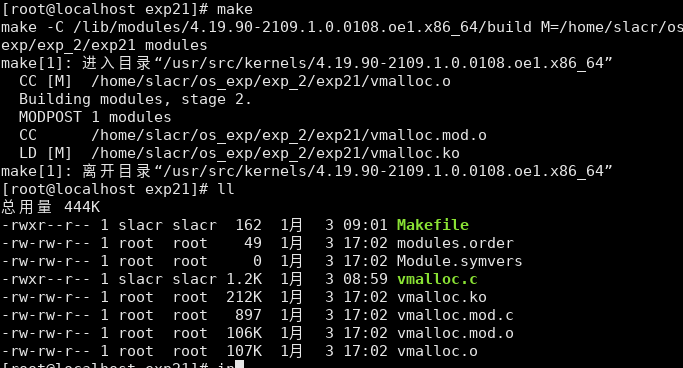
编译
加载, 查看, 卸载模块
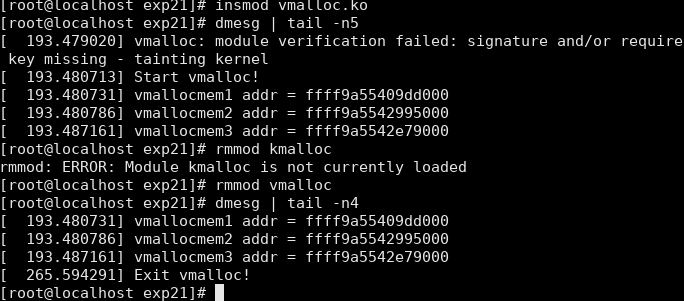
使用 vmalloc 分配 8KB、1MB、64MB 的内存,打印指针地址
: vmalloc.c 1 2 3 4 5 6 7 8 9 10 11 12 13 14 15 16 17 18 19 20 21 22 23 24 25 26 27 28 29 30 31 32 33 34 35 36 37 38 39 40 41 42 43 44 45 46 47 #include <linux/module.h> #include <linux/vmalloc.h> MODULE_LICENSE("GPL" ); unsigned char *vmallocmem1;unsigned char *vmallocmem2;unsigned char *vmallocmem3;static int __init mem_module_init (void ) { printk("Start vmalloc!\n" ); vmallocmem1 = (unsigned char *)vmalloc(8192 ); if (vmallocmem1 != NULL ) { printk(KERN_ALERT "vmallocmem1 addr = %px\n" , vmallocmem1); } else { printk("Failed to allocate vmallocmem1!\n" ); } vmallocmem2 = (unsigned char *)vmalloc(1048576 ); if (vmallocmem2 != NULL ) { printk(KERN_ALERT "vmallocmem2 addr = %px\n" , vmallocmem2); } else { printk("Failed to allocate vmallocmem2!\n" ); } vmallocmem3 = (unsigned char *)vmalloc(67108864 ); if (vmallocmem3 != NULL ) { printk(KERN_ALERT "vmallocmem3 addr = %px\n" , vmallocmem3); } else { printk("Failed to allocate vmallocmem3!\n" ); } return 0 ; } static void __exit mem_module_exit (void ) { vfree(vmallocmem1); vfree(vmallocmem2); vfree(vmallocmem3); printk("Exit vmalloc!\n" ); } module_init(mem_module_init); module_exit(mem_module_exit);
1 2 3 4 5 6 7 obj-m += vmalloc.o all: make -C /lib/modules/
(shell uname -r)/build M=
(PWD) modules clean: make -C /lib/modules/
(shell uname -r)/build M=
(PWD) clean
实验结果分析
查阅相关资料分析 kmalloc 和 vmalloc 分配的内存地址是否都位于内核空间?
kmalloc 和 vmalloc 分配的内存地址都位于内核空间。
kmalloc 是内核中用于分配连续内存块的函数。它在内核堆中分配内存,并返回指向分配内存的指针。这些内存块位于内核虚拟地址空间中,通常用于分配较小的连续内存区域。
vmalloc 则用于分配大块的内存,这些内存可能不是连续的。它在内核虚拟地址空间中分配内存,并返回指向分配内存的指针。vmalloc 可以用于分配较大的内存区域,但由于分配的内存不是连续的,所以访问这些内存可能会比连续内存访问稍微慢一些。
实验三 进程管理
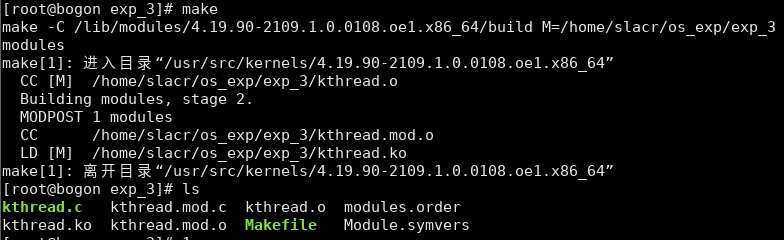
创建内核进程
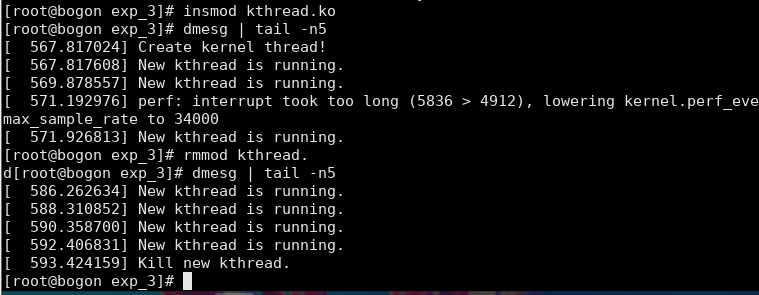
: kthread.c 1 2 3 4 5 6 7 8 9 10 11 12 13 14 15 16 17 18 19 20 21 22 23 24 25 26 27 28 29 30 31 32 33 #include <linux/kthread.h> #include <linux/module.h> #include <linux/delay.h> MODULE_LICENSE("GPL" ); #define BUF_SIZE 20 static struct task_struct *myThread =NULL ;static int print (void *data) { while (!kthread_should_stop()) { printk("New kthread is running." ); msleep(2000 ); } return 0 ; } static int __init kthread_init (void ) { printk("Create kernel thread!\n" ); myThread = kthread_run(print, NULL , "myThread" ); return 0 ; } static void __exit kthread_exit (void ) { printk("Kill new kthread.\n" ); if (myThread) kthread_stop(myThread); } module_init(kthread_init); module_exit(kthread_exit);
1 2 3 4 5 6 7 obj-m += kthread.o all: make -C /lib/modules/
(shell uname -r)/build M=
(PWD) modules clean: make -C /lib/modules/
(shell uname -r)/build M=
(PWD) clean
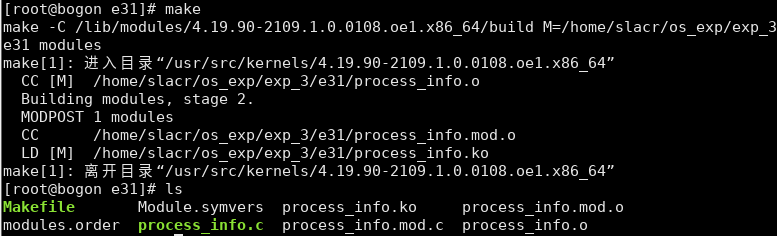
编译源文件
加载模块, 查看内核消息结果, 卸载模块
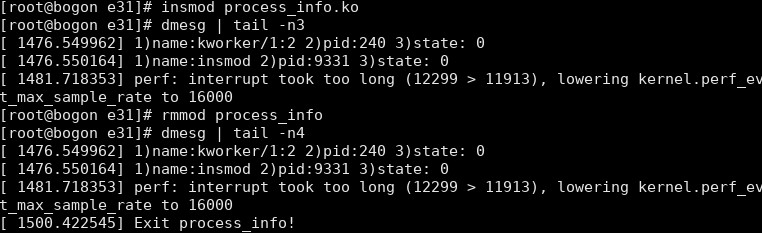
打印输出当前处于运行状态的进程的 PID 和名字
: process_info.c 1 2 3 4 5 6 7 8 9 10 11 12 13 14 15 16 17 18 19 20 21 22 23 24 #include <linux/module.h> #include <linux/sched/signal.h> #include <linux/sched.h> MODULE_LICENSE("GPL" ); struct task_struct *p ;static int __init process_info_init (void ) { printk("Start process_info!\n" ); for_each_process(p) { if (task_state(p) == TASK_RUNNING) printk("1)name:%s 2)pid:%d 3)state: %ld\n" , p->comm, p->pid, p->state); } return 0 ; } static void __exit process_info_exit (void ) { printk("Exit process_info!\n" ); } module_init(process_info_init); module_exit(process_info_exit);
1 2 3 4 5 6 7 obj-m += process_info.o all: make -C /lib/modules/
(shell uname -r)/build M=
(PWD) modules clean: make -C /lib/modules/
(shell uname -r)/build M=
(PWD) clean
实验四 中断和异常管理
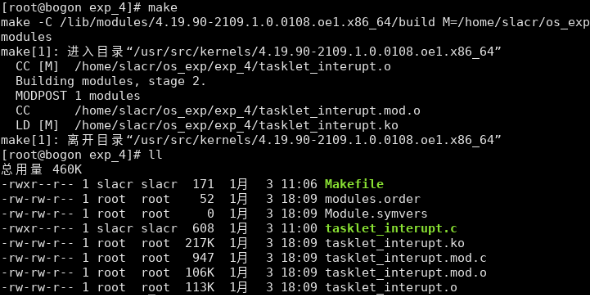
使用 tasklet 实现打印 helloworld
: tasklet_interupt.c 1 2 3 4 5 6 7 8 9 10 11 12 13 14 15 16 17 18 19 20 21 22 23 24 25 26 #include <linux/module.h> #include <linux/interrupt.h> MODULE_LICENSE("GPL" ); static struct tasklet_struct my_tasklet ;static void tasklet_handler (unsigned long data) { printk("Hello World! tasklet is working...\n" ); } static int __init mytasklet_init (void ) { printk("Start tasklet module...\n" ); tasklet_init(&my_tasklet, tasklet_handler, 0 ); tasklet_schedule(&my_tasklet); return 0 ; } static void __exit mytasklet_exit (void ) { tasklet_kill(&my_tasklet); printk("Exit tasklet module...\n" ); } module_init(mytasklet_init); module_exit(mytasklet_exit);
1 2 3 4 5 6 7 obj-m += tasklet_interupt.o all: make -C /lib/modules/
(shell uname -r)/build M=
(PWD) modules clean: make -C /lib/modules/
(shell uname -r)/build M=
(PWD) clean
编译
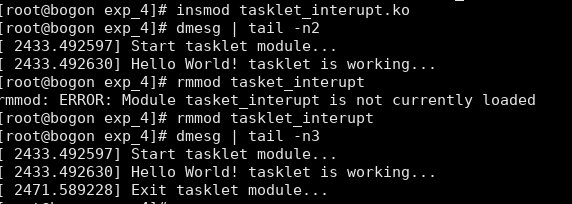
加载模块, 查看结果, 卸载模块
用工作队列实现周期打印 helloworld
: workqueue_test.c 1 2 3 4 5 6 7 8 9 10 11 12 13 14 15 16 17 18 19 20 21 22 23 24 25 26 27 28 29 30 31 32 33 34 35 36 37 38 39 40 #include <linux/module.h> #include <linux/workqueue.h> #include <linux/delay.h> MODULE_LICENSE("GPL" ); static struct workqueue_struct *queue =NULL ;static struct delayed_work mywork ;static int i = 0 ;void work_handle (struct work_struct *work) { printk(KERN_ALERT "Hello World!\n" ); } static int __init timewq_init (void ) { printk(KERN_ALERT "Start workqueue_test module." ); queue = create_singlethread_workqueue("workqueue_test" ); if (queue == NULL ) { printk(KERN_ALERT "Failed to create workqueue_test!\n" ); return -1 ; } INIT_DELAYED_WORK(&mywork, work_handle); for (;i<= 3 ; i++){ queue_delayed_work(queue , &mywork, 5 * HZ); ssleep(15 ); } return 0 ; } static void __exit timewq_exit (void ) { flush_workqueue(queue ); destroy_workqueue(queue ); printk(KERN_ALERT "Exit workqueue_test module." ); } module_init(timewq_init); module_exit(timewq_exit);
1 2 3 4 5 6 7 obj-m += workqueue_test.o all: make -C /lib/modules/
(shell uname -r)/build M=
(PWD) modules clean: make -C /lib/modules/
(shell uname -r)/build M=
(PWD) clean
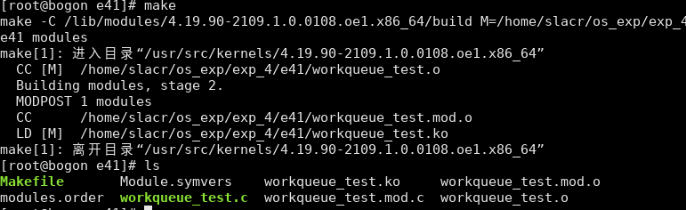
编译
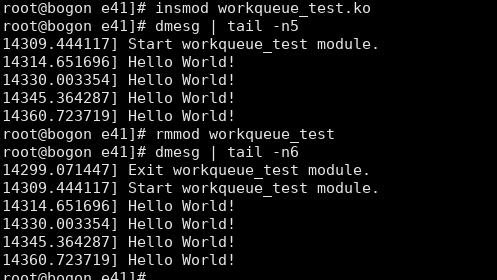
查看结果
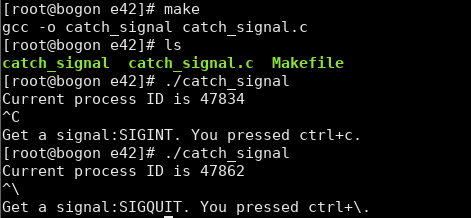
编写一个信号捕获程序,捕获终端按键信号
: catch_signal.c 1 2 3 4 5 6 7 8 9 10 11 12 13 14 15 16 17 18 19 20 21 22 23 24 25 26 27 28 29 #include <signal.h> #include <unistd.h> #include <stdio.h> #include <stdlib.h> void signal_handler (int sig) { switch (sig) { case SIGINT: printf ("\nGet a signal:SIGINT. You pressed ctrl+c.\n" ); break ; case SIGQUIT: printf ("\nGet a signal:SIGQUIT. You pressed ctrl+\\.\n" ); break ; case SIGTSTP: printf ("\nGet a signal:SIGTSTP. You pressed ctrl+z.\n" ); break ; } exit (0 ); } int main () { printf ("Current process ID is %d\n" , getpid()); signal(SIGINT, signal_handler); signal(SIGQUIT, signal_handler); signal(SIGTSTP, signal_handler); for (;;); }
1 2 3 4 5 all: gcc -o catch_signal catch_signal.c clean: rm -f catch_signal
实验五 设备管理
编写内核模块测试硬盘的写速率
: write_to_disk.c 1 2 3 4 5 6 7 8 9 10 11 12 13 14 15 16 17 18 19 20 21 22 23 24 25 26 27 28 29 30 31 32 33 34 35 36 37 38 39 40 41 42 43 44 45 46 47 48 49 50 51 52 53 54 55 56 57 58 59 60 61 62 63 64 65 66 67 68 69 70 #include <linux/module.h> #include <linux/fs.h> #include <linux/rtc.h> #include <linux/file.h> #include <linux/uaccess.h> #define BUF_SIZE 1024 #define WRITE_TIMES 524288 MODULE_LICENSE("GPL" ); struct timeval tv ;static int __init write_disk_init (void ) { struct file *fp_write ; char buf[BUF_SIZE]; int i; int write_start_time; int write_start_time_u; int write_end_time; int write_end_time_u; int write_time; loff_t pos; printk("Start write_to_disk module...\n" ); for (i = 0 ; i < BUF_SIZE; i++) { buf[i] = i + '0' ; } fp_write = filp_open("/home/tmp_file" , O_RDWR | O_CREAT, 0644 ); if (IS_ERR(fp_write)) { printk("Failed to open file...\n" ); return -1 ; } pos = 0 ; do_gettimeofday(&tv); write_start_time = (int )tv.tv_sec; write_start_time_u = (int )tv.tv_usec; for (i = 0 ; i < WRITE_TIMES; i++) { kernel_write(fp_write, buf, BUF_SIZE, &pos); } do_gettimeofday(&tv); write_end_time = (int )tv.tv_sec; write_end_time_u = (int )tv.tv_usec; filp_close(fp_write, NULL ); write_time = (write_end_time - write_start_time) * 1000000 + (write_end_time_u - write_start_time_u); printk(KERN_ALERT "Writing to file costs %d us\n" , write_time); printk("Writing speed is %d M/s\n" , BUF_SIZE * WRITE_TIMES / write_time); return 0 ; } static void __exit write_disk_exit (void ) { printk("Exit write_to_disk module...\n" ); } module_init(write_disk_init); module_exit(write_disk_exit);
1 2 3 4 5 6 7 obj-m += write_to_disk.o all: make -C /lib/modules/
(shell uname -r)/build M=
(PWD) modules clean: make -C /lib/modules/
(shell uname -r)/build M=
(PWD) clean
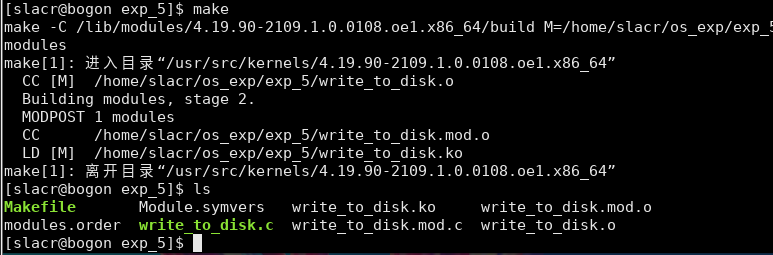
编译
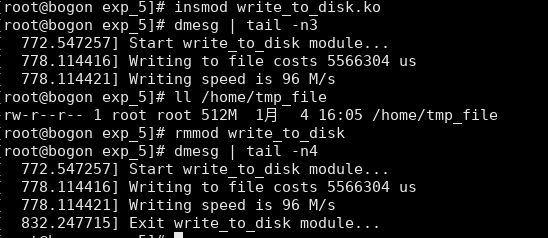
查看结果
编写内核模块测试硬盘的读速率
: read_from_disk.c 1 2 3 4 5 6 7 8 9 10 11 12 13 14 15 16 17 18 19 20 21 22 23 24 25 26 27 28 29 30 31 32 33 34 35 36 37 38 39 40 41 42 43 44 45 46 47 48 49 50 51 52 53 54 55 56 57 58 59 60 61 62 63 64 65 #include <linux/module.h> #include <linux/fs.h> #include <linux/rtc.h> #include <linux/file.h> #include <linux/uaccess.h> #define BUF_SIZE 1024 #define READ_TIMES 524288 MODULE_LICENSE("GPL" ); struct timeval tv ;static int __init read_disk_init (void ) { struct file *fp_read ; char buf[BUF_SIZE]; int i; int read_start_time; int read_start_time_u; int read_end_time; int read_end_time_u; int read_time; loff_t pos; printk("Start read_from_disk module...\n" ); fp_read = filp_open("/home/tmp_file" , O_RDONLY, 0 ); if (IS_ERR(fp_read)) { printk("Failed to open file...\n" ); return -1 ; } pos = 0 ; do_gettimeofday(&tv); read_start_time = (int )tv.tv_sec; read_start_time_u = (int )tv.tv_usec; for (i = 0 ; i < READ_TIMES; i++) { kernel_read(fp_read, buf, BUF_SIZE, &pos); } do_gettimeofday(&tv); read_end_time = (int )tv.tv_sec; read_end_time_u = (int )tv.tv_usec; filp_close(fp_read, NULL ); read_time = (read_end_time - read_start_time) * 1000000 + (read_end_time_u - read_start_time_u); printk(KERN_ALERT "Reading from file costs %d us\n" , read_time); printk("Reading speed is %d M/s\n" , BUF_SIZE * READ_TIMES / read_time); return 0 ; } static void __exit read_disk_exit (void ) { printk("Exit read_from_disk module...\n" ); } module_init(read_disk_init); module_exit(read_disk_exit);
1 2 3 4 5 6 7 obj-m += read_from_disk.o all: make -C /lib/modules/
(shell uname -r)/build M=
(PWD) modules clean: make -C /lib/modules/
(shell uname -r)/build M=
(PWD) clean
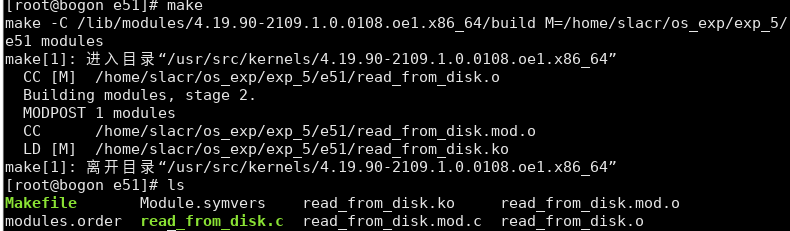
编译
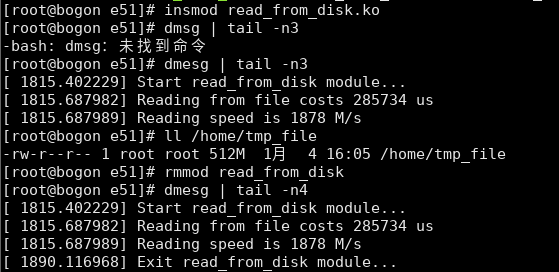
查看结果
实验六 文件系统
为 Ext4 文件系统添加扩展属性
安装libattr
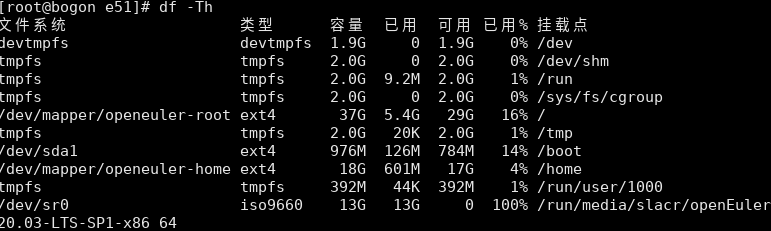
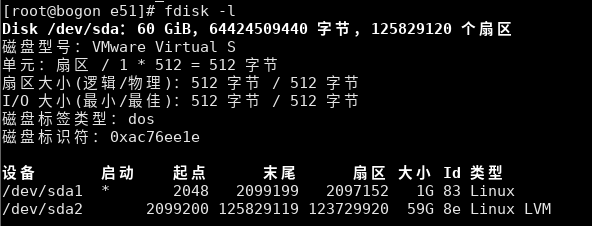
查看当前文件系统类型
检查当前文件系统是否支持文件扩展属性
1 2 3 4 fdisk -l tune2fs -l /dev/sda1 | grep user_xattr
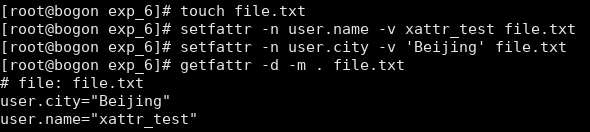
创建文件 file.txt,用 setfattr 设置文件系统对象的扩展属性
1 2 3 setfattr -n user.name -v xattr_test file.txt setfattr -n user.city -v 'Beijing' file.txt getfattr -d -m . file.txt
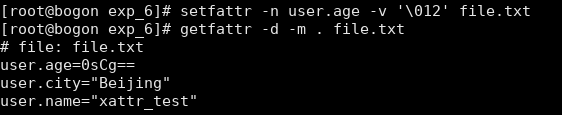
1 setfattr -n user.age -v '\012' file.txt
以八进制数的 base64 编码存储, \012 是一个八进制转义序列,表示 ASCII 字符集中的换行符’\n’。
1 2 3 4 5 6 7 8 9 10 11 import base64attribute_value = '\012' encoded_value = base64.b64encode(attribute_value.encode('utf-8' )).decode('utf-8' ) decoded_value = base64.b64decode(encoded_value).decode('utf-8' ) print ('编码后的属性值:' , encoded_value)print ('解码后的属性值:' , decoded_value)
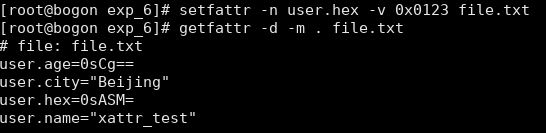
设置十六进制数属性值
1 2 setfattr -n user.hex -v 0x0123 file.txt getfattr -d -m . file.txt
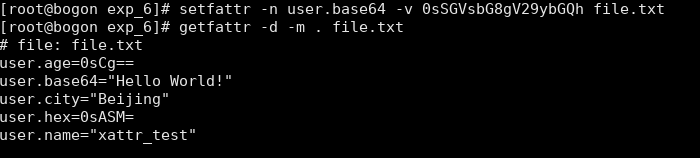
设置 base64 编码属性值
1 2 setfattr -n user.base64 -v 0sSGVsbG8gV29ybGQh file.txt getfattr -d -m . file.txt
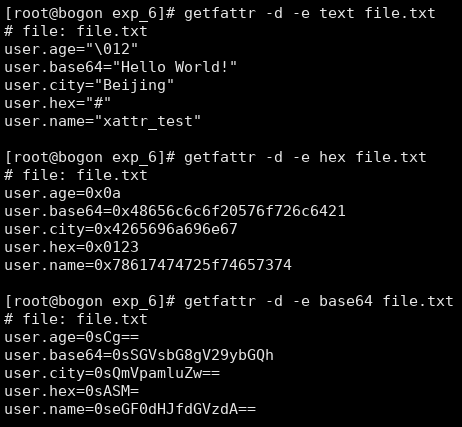
用getfattr 编码设置
1 2 3 4 getfattr -d -m . base64 file.txt getfattr -d -e text file.txt getfattr -d -e hex file.txt getfattr -d -e base64 file.txt
注册一个自定义的文件系统类型
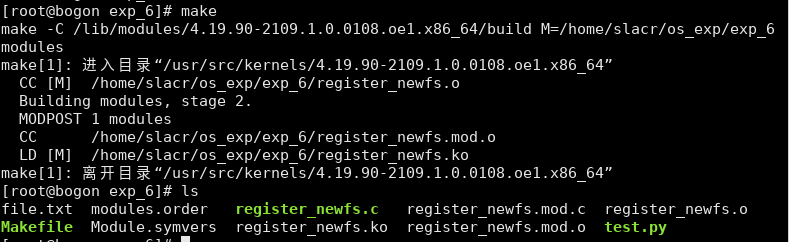
: register_newfs.c 1 2 3 4 5 6 7 8 9 10 11 12 13 14 15 16 17 18 19 20 21 22 23 #include <linux/module.h> #include <linux/fs.h> MODULE_LICENSE("GPL" ); static struct file_system_type myfs_type = .name = "myfs" , .owner = THIS_MODULE, }; static int __init register_newfs_init (void ) { printk("Start register_newfs module..." ); return register_filesystem(&myfs_type); } static void __exit register_newfs_exit (void ) { printk("Exit register_newfs module..." ); unregister_filesystem(&myfs_type); } module_init(register_newfs_init); module_exit(register_newfs_exit);
1 2 3 4 5 6 7 obj-m += register_newfs.o all: make -C /lib/modules/
(shell uname -r)/build M=
(PWD) modules clean: make -C /lib/modules/
(shell uname -r)/build M=
(PWD) clean
编译
查看加载前后文件系统
卸载模块
当未加载内核模块时,当前系统中无自定义的文件系统“myfs”;当加载内核
在/proc 下创建目录
: proc_mkdir.c 1 2 3 4 5 6 7 8 9 10 11 12 13 14 15 16 17 18 19 20 21 22 23 24 #include <linux/module.h> #include <linux/proc_fs.h> MODULE_LICENSE("GPL" ); static struct proc_dir_entry *myproc_dir ;static int __init myproc_init (void ) { int ret = 0 ; printk("Start proc_mkdir module..." ); myproc_dir = proc_mkdir("myproc" , NULL ); if (myproc_dir == NULL ) return -ENOMEM; return ret; } static void __exit myproc_exit (void ) { printk("Exit proc_mkdir module..." ); proc_remove(myproc_dir); } module_init(myproc_init); module_exit(myproc_exit);
1 2 3 4 5 6 7 obj-m += proc_mkdir.o all: make -C /lib/modules/
(shell uname -r)/build M=
(PWD) modules clean: make -C /lib/modules/
(shell uname -r)/build M=
(PWD) clean
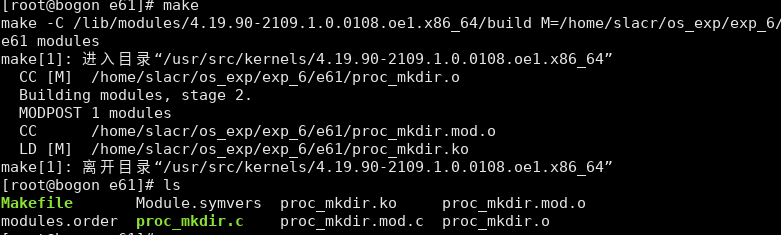
编译
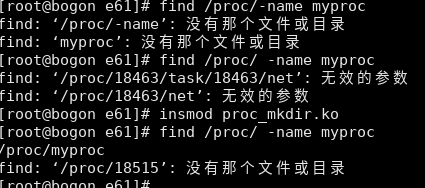
对比加载内核模块前后的文件系统结果.
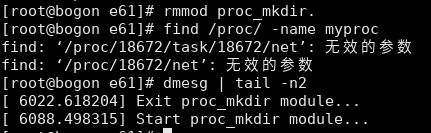
卸载内核模块,并查看结果.
当未加载内核模块时,/proc 下无 myproc 目录;当加载内核模块后,/proc
实验七 网络管理
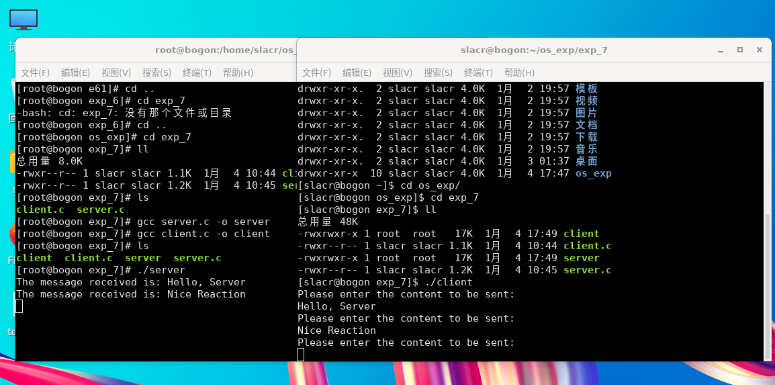
编写基于 socket 的 UDP发送接收程序
: client.c 1 2 3 4 5 6 7 8 9 10 11 12 13 14 15 16 17 18 19 20 21 22 23 24 25 26 27 28 29 30 31 32 33 34 35 36 37 38 39 40 41 42 #include <stdio.h> #include <string.h> #include <sys/socket.h> #include <arpa/inet.h> #include <unistd.h> #define PORT 40000 #define BUF_SIZE 1024 int main (void ) { int sock_fd; char buffer[BUF_SIZE]; int size; int len; int ret; struct sockaddr_in server_addr ; if ((sock_fd = socket(AF_INET, SOCK_DGRAM, IPPROTO_IP)) == -1 ) { printf ("Failed to create a socket!\n" ); return 0 ; } memset (&server_addr, 0 , sizeof (server_addr)); server_addr.sin_family = AF_INET; server_addr.sin_port = htons(PORT); server_addr.sin_addr.s_addr = inet_addr("127.0.0.1" ); bzero(buffer, BUF_SIZE); len = sizeof (server_addr); while (1 ) { printf ("Please enter the content to be sent:\n" ); size = read(0 , buffer, BUF_SIZE); if (size) { sendto(sock_fd, buffer, size, 0 , (struct sockaddr*)&server_addr, len); bzero(buffer, BUF_SIZE); } } close(sock_fd); return 0 ; }
: server.c 1 2 3 4 5 6 7 8 9 10 11 12 13 14 15 16 17 18 19 20 21 22 23 24 25 26 27 28 29 30 31 32 33 34 35 36 37 38 39 40 41 42 43 44 45 #include <stdio.h> #include <string.h> #include <sys/types.h> #include <sys/socket.h> #include <arpa/inet.h> #include <unistd.h> #define PORT 40000 #define BUF_SIZE 1024 int main (void ) { int sock_fd; int len; char buffer[BUF_SIZE]; struct sockaddr_in server_addr , client_addr ; if ((sock_fd = socket(AF_INET, SOCK_DGRAM, 0 )) == -1 ) { printf ("Failed to create a socket!\n" ); return 0 ; } memset (&server_addr, 0 , sizeof (server_addr)); server_addr.sin_family = AF_INET; server_addr.sin_port = htons(PORT); server_addr.sin_addr.s_addr = htonl(INADDR_ANY); if (bind(sock_fd, (struct sockaddr*)&server_addr, sizeof (server_addr)) == -1 ) { printf ("Failed to bind the socket!\n" ); return 0 ; } len = sizeof (client_addr); while (1 ) { bzero(buffer, BUF_SIZE); if (recvfrom(sock_fd, buffer, BUF_SIZE, 0 , (struct sockaddr*)&client_addr, &len) != -1 ) { printf ("The message received is: %s" , buffer); } } return 0 ; }
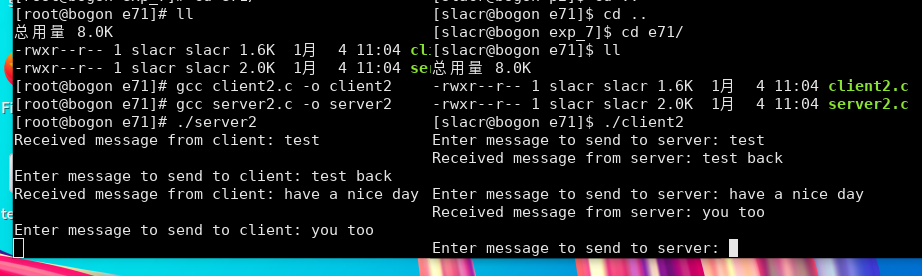
实现一个点对点的聊天程序
: client2.c 1 2 3 4 5 6 7 8 9 10 11 12 13 14 15 16 17 18 19 20 21 22 23 24 25 26 27 28 29 30 31 32 33 34 35 36 37 38 39 40 41 42 43 44 45 46 47 48 49 50 51 52 53 54 55 56 57 #include <stdio.h> #include <string.h> #include <sys/types.h> #include <sys/socket.h> #include <arpa/inet.h> #include <unistd.h> #define PORT 40000 #define BUF_SIZE 1024 int main (void ) { int sock_fd; int len; char buffer[BUF_SIZE]; struct sockaddr_in server_addr ; if ((sock_fd = socket(AF_INET, SOCK_STREAM, 0 )) == -1 ) { printf ("Failed to create a socket!\n" ); return 0 ; } memset (&server_addr, 0 , sizeof (server_addr)); server_addr.sin_family = AF_INET; server_addr.sin_port = htons(PORT); server_addr.sin_addr.s_addr = inet_addr("127.0.0.1" ); if (connect(sock_fd, (struct sockaddr*)&server_addr, sizeof (server_addr)) == -1 ) { printf ("Failed to connect to the server!\n" ); return 0 ; } while (1 ) { printf ("Enter message to send to server: " ); fgets(buffer, BUF_SIZE, stdin ); if (send(sock_fd, buffer, strlen (buffer), 0 ) == -1 ) { printf ("Failed to send message to the server!\n" ); break ; } bzero(buffer, BUF_SIZE); if (recv(sock_fd, buffer, BUF_SIZE, 0 ) == -1 ) { printf ("Failed to receive message from the server!\n" ); break ; } printf ("Received message from server: %s\n" , buffer); } close(sock_fd); return 0 ; }
: server2.c 1 2 3 4 5 6 7 8 9 10 11 12 13 14 15 16 17 18 19 20 21 22 23 24 25 26 27 28 29 30 31 32 33 34 35 36 37 38 39 40 41 42 43 44 45 46 47 48 49 50 51 52 53 54 55 56 57 58 59 60 61 62 63 64 65 66 67 68 69 70 71 #include <stdio.h> #include <string.h> #include <sys/types.h> #include <sys/socket.h> #include <arpa/inet.h> #include <unistd.h> #define PORT 40000 #define BUF_SIZE 1024 int main (void ) { int server_fd, client_fd; int len; char buffer[BUF_SIZE]; struct sockaddr_in server_addr , client_addr ; if ((server_fd = socket(AF_INET, SOCK_STREAM, 0 )) == -1 ) { printf ("Failed to create a socket!\n" ); return 0 ; } memset (&server_addr, 0 , sizeof (server_addr)); server_addr.sin_family = AF_INET; server_addr.sin_port = htons(PORT); server_addr.sin_addr.s_addr = htonl(INADDR_ANY); if (bind(server_fd, (struct sockaddr*)&server_addr, sizeof (server_addr)) == -1 ) { printf ("Failed to bind the socket!\n" ); return 0 ; } if (listen(server_fd, 5 ) == -1 ) { printf ("Failed to listen on the socket!\n" ); return 0 ; } len = sizeof (client_addr); if ((client_fd = accept(server_fd, (struct sockaddr*)&client_addr, &len)) == -1 ) { printf ("Failed to accept the connection!\n" ); return 0 ; } while (1 ) { bzero(buffer, BUF_SIZE); if (recv(client_fd, buffer, BUF_SIZE, 0 ) == -1 ) { printf ("Failed to receive message from the client!\n" ); break ; } printf ("Received message from client: %s\n" , buffer); printf ("Enter message to send to client: " ); fgets(buffer, BUF_SIZE, stdin ); if (send(client_fd, buffer, strlen (buffer), 0 ) == -1 ) { printf ("Failed to send message to the client!\n" ); break ; } } close(client_fd); close(server_fd); return 0 ; }
综合实验
安装配置iSulad
1 2 3 4 5 6 7 8 9 10 11 12 yum install -y iSulad systemctl enable --now isulad systemctl status isulad isulad version yum install jq -y cd /etc/isuladcp daemon.json daemon.json.backupvi daemon.json
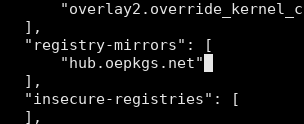
修改 registry-mirrors
1 2 3 cat daemon.json | jqsystemctl restart isulad
运行容器 busybox
1 2 isula run busybox echo "hello world" isula images
isulad 常用命令
isula images
查看镜像
isula create -it <container_name>
创建容器
isula ps
运行状态的容器, -a 所有容器
isula run <container_id>
启动容器
isula run <container_name/id>
创建并运行容器
isula run -it <container_name/id>
交互式运行容器
isula pause/unpause <container_name/id>
暂停/恢复容器
isula stop <container_name/id>
停止容器
isula rm <container_name/id>
删除容器, -f 强制删除
isula rm -f $(isula ps -a)
删除所有容器
isula rmi <images_name>
删除镜像
下载镜像并运行容器
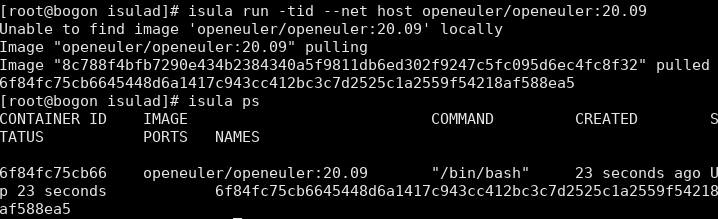
使用宿主机网络创建并运行openeuler 容器
1 2 isula run -tid --net host openeuler/openeuler:20.09 isula ps
运行容器
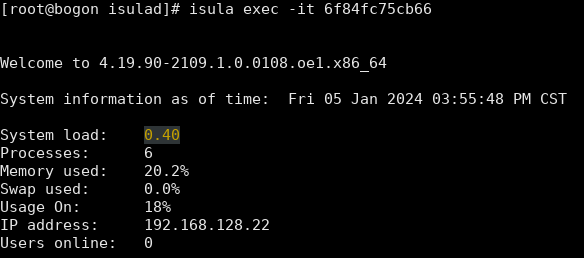
1 isula exec -it <Container_id>
容器里的yum 源有点问题, 可以用主机的配置文件替换
1 2 3 4 5 6 7 8 9 10 11 cd /etc/yum.repos.d/isulad cp openEuler.repo <container_id>:/home isula exec -it <container_id> cd /etc/yum.repos.d/mv openEuler.repo openEuler.repo.backupmv /home/openEuler.repo ./yum clean all && yum makecache yum install gcc make git -y
下载Web Server编译运行
1 2 3 4 5 6 7 8 9 git clone https://github.com/marcustedesco/webserver.git isula ps isula cp webserver <container_id>:/home isula exec -it <container_id> cd /home/webservermake all ./runServer
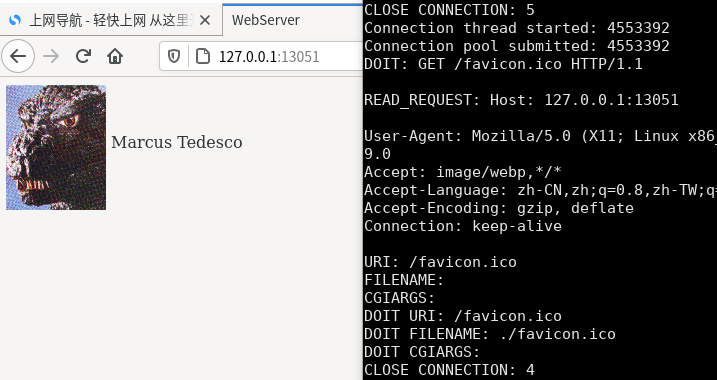
访问web页面
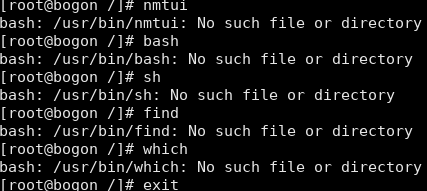
bash: xxx no such file or directory 卡死
遇到点问题, 只要在容器内安装gcc 后, 交互式容器会卡死, 找不到对应的命令, 退出后无法再进入. 检查PATH 也没问题, 不知道那错了, 可能是gcc 安装的时候覆盖了isula某些重要配置, 只好重新创建容器, 容器中也用不上gcc, 在主机中编译好server再传进去.
1 2 3 4 isula rm -f <container_id> isula run -tid --net host openeuler/openeuler:20.09 /bin/bash isula cp webserver <container_id>:/home isula exec -it <coutianer_id> /bin/bash
解决容器内下载慢的问题
使用官方源会下载很慢, 只有十几k/s
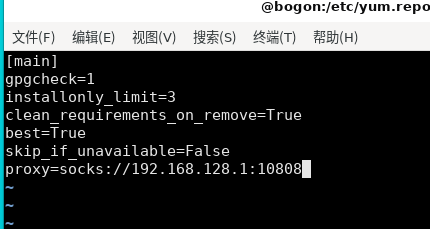
配置yum代理, 发现网速稍微提高了, 但还是很慢
换成阿里的源
1 2 sed -i "s#repo.openeuler.org#mirrors.aliyun.com/openeuler#g" /etc/yum.repos.d/openEuler.repo yum clean all && yum makecache
速度明显快多了
其他
部署SMB实现文件共享
方便传文件
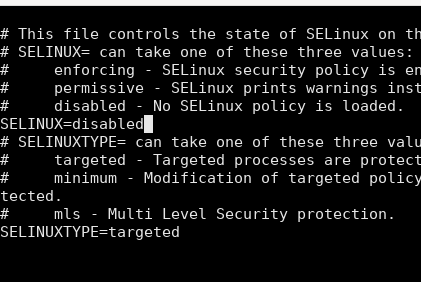
1 2 3 4 5 6 7 8 9 10 11 12 13 14 15 16 17 18 sudo yum install samba vim /etc/samba/smb.conf ... pdbedit -a -u slacr ... mkdir /home/publicchown -Rf slacr:slacr /home/publicsestatus getenforce vi /etc/selinux/config systemctl enable --now smb reboot sestatus
1 2 3 4 5 6 7 8 iptables -F iptables-save firewall-cmd --perm --add-service=samba firewall-cmd --reload firewall-cmd --list-all systemctl reload smb
U2FsdGVkX18C8ZlBBRNN7+Sf/X5cThh7cck1tV2mvIIMz+pIvZR0UaFFD6eYci1/kzgX597qjeK27duEtVrubfq4Z5XiCOJDwRCUE8HZWjHTuRTz05ouW8gYXECLA9A049ADCe6mjdsr0U0EGMXl8Q44AMPVQ715O+hOse9K6X9IcneuG5fg08oV6XwwFH0AB3bv5chGTXEERwk5ANw0tMM8zxLWrkX3ioiSYIit/ISLBVc0dtBoyIPEep8SrNq83NyC5R/UHn6HAzUfIKAfMOy15QZOwp/TxS4N4APz0nOOk5gPrqy/779F5m2j0DZoI4tadQz6wgkBbsaLW2c0h7pj1TSeAfcGu0qe7pV51sDmYdMhLzbAviMClgkEsf9qIC7z8MXQiUIhLXk5tnTlRLhztYTwvXTTiV+uVsArFgOU+BlI31KE4d0gazUzoBf6/nZiHUVG3V+R+5H85B9QgM7aFtVlcr4slyPdXny4JTs5qYP8krHmL6uXmCF0/7mtTHjv/02xAAPK6be0bVOgxGfu6yEOnuDe7jBJSEMmjQL/orgXfwxbA7jl7OBcD0ESEgZdTI/N8ctrqinLg++0FQDN06ykzPDVYkFPS6SaEVDHLJwN5fNK6tDHAuRkTCcwbdRZXjmik45dZavi5zjWesHH0yXnLGW42m1cwBNVHlt3R6F7lMwlP2/9vB4DgRFnku+4H5rklA455O3B5zN6pVanE/f13py0otBBJ6M94TJDbRDPFVHtxuhxig3H4BhNPrDPdLSIzwv7RnVIZB8vdN9Hl/8ddZMwt35GOnrhUba3BcN3nxyz2FPFrtcPdVPlrR+EDdjjVJQPrrITJ/BfLAxMO9hmUFD7tWjC2xwAUVhzoqsGdTkTt0cmSvkdpNn+BR3sReXfaXOvOMvwwoGMZd6j4lrmGB2gqCxDbMWavf7WXsInZYTY93ipEB8YgGHE9eHzIXfsh1YIStLpDmuBgr/S016PvcRFKX3Y792VJbpQzUtbKGwR1nNcBvt5aB8ya51/FY1c5P+PRmspwcIOaufK9QQBBHjqBaJJ83Ptck9YFxilB3QONCw6KmipmfW7pC1EAgPB1vnnZ1kSOgRK8wlyg4z3E50VZA825itCAY0CnyrYL8qKe/teTMJh8kmFgQVz37CMdn5qcbDBP+LSsCIGENSiiFnIkycEQ1zZROVZTmzTy45ntD+NMlptZrzcHli6DVRKH4z0jYBT9e0ElmQCqG6/h1tCr/J2393DZusaNvQ4BwP4lXAnzjXN2SO4J4ZshbTxt72CZmuMp458WE+kH11IYeSx8YEJiwFkJb13tFeo8PZPh0EMILY0H4sxLItePEQwyMWZKuMDTfCNw9rECLI8+7Loni1w7K53uQqfC0MBF2bSBVKpOJ0uXyV/dUPwtq/kAdaQV4XBPTTvDgwajaulxF2b2DW8ZNJTjSuPJm67hr8eap0cPNrsYOQYw1NARXHcaHQHRsgDuE+BnfVMyIaICRz6pCRhGPpYaoqP/l9sRCgNgSx37VH5IrBQnbix2yi+jNGS+wrQDyN9DvPnM7ZfOADm+78VD+geYiLXGSxyBHs1EI5TK/0F7ha3ssbiNemq6aOK305OB8XvN4hqPoaRo1EGBeUsvdoPH04x+H6wtYVqf6HtmjeziNFqAEfo0hhP5IFT/hzzU2R+AbUfL9O+1AdsEY4TBsFC9tKLr90j84pU67Go9s1pRLEjb5s7hefo69MVOAi72KpMAmN5IuqFyyW3iFANd20IRTgG7p0OlxIMySgaae4iW0dcIL2ZgQk6eNYYpkaZnhhtpEOLKBtn6LW+Hndtf3x8llnmbCYxC8kKfVQHsgjOjjjXxhMlPtpbdOcwnolcQ1dfBRrtJK7vFP5yS5eCrtVhTVZ6paoJ40vm/csyy02IBLjUTe3OZM6D95nIVpFR7sBMfLBxEPgmmdf2FQqlVrZxwdgOKXwkw5/pEqH/1O06Xav7Gpmno2xPvqTjSp0C1hXPdduaB5DS52izNKkI5y4wS/8wwp/2R4kaWL1LMvcDrD0+Hf4yVQ9pe8MSI3VbP+8sXkAM+K9Bknki/xt7t0DzT8u7A7pXEBRR9NTrmb5+r4BHVteH0dVmXcz/xT0x8KEpgp3/Wy98MxE3uYAKyZvsURCpv1nEQ8aFCeIGKbDdHxuQlpm8lvH0QHh6XAfjhn28ppB3JHMeuUa+a/2W0n9fDcMf7co7/Ox08DEyXaSLGfpHCAFirRg4lKqyJvKox0TEwdtAdkdCbtqGgjvA/Oe68d7Ut8YhUAoPsShThKmaZJQIe34bE7TLOiVvz2FFDnzHhbSSA/La6Q0NjWPYaeoEv4benK73S8MHzTWnijeN8OLOPa3NqWV6C144e6DULYtgZP6rCd4JN9SfiIVw4aK7jdkRN3WCIepciPfjj1sOCL+D5uqNtd12C6c2JDIjg/EQ6UkrxVvawGM+aIDG1s1Zo8idio47hftzl2LAP/NcHNZFfYnxvV0TLIUtslb6t1TToGzdMz0SUpaUqOBkSQxnK8TwHTiPsWBo9McUqcHYEW+tuzvmBH46n/UARhXhKtGiRjToMNijlajPyfzKscc/1w5AquuB3j59Q8axY9dCw/inLc4dsUHVMUEplH9MxQZt5oyiaW/Mcn2s62vtHj10BQZ7nvwqpC9hmRQ+4Hmem6Nh1KBibQorSKpHUOl4KjOYpwklzjfCv91oOVzB2BSCPRnaZYpSShwoNtB+SOIsvtATVpfiVz/Dt/vLXifqENtzduwa/Zqee5Gy7QWrzBqAMX9nJQ7tXEpLqmtQhDxQu8vxytNdPw0fFPvZSGRHx1Q/rduQUz9aRv2qhiBD1ykuwNgowGueghUnlafkGX8PZGXPotDLo3bMYNmN014dWLNh/iU8ZBHnGoA1QMKscsb26AycU1jrWHIEGCY/jGIBtWyiJU+FMU3XymlAFg7oNG0YM47S81hK6tDDktB+vqxaBhQEh/JOQqk0FU03YDXPXqBXE0M6KQIn90RRih3zlDzW82Xanir03zI/TjxyQ0QAMkoJqwtCK/QY5LsqG2wATQIkbHbRzHOxxQThZZ+ZF/n6igkR71c7nqLagxOehs97CdZsf7CoukvW1pt8FgFK2FixwQP0Q/EWrXL843w0s2oiZFaDufWMh6uWMswAGyN4gBinpGmoQTxQExzUdOWNfZ4g8kx9iJ9mByhlzsogK8lvsCwyMlVsvOVA3nLMF8LAyzcQJU27dFOpQjDuUlD00RJZyBnj0zE1jV3bIbBHS2+LdrjAqw16Xy9QCvtpFbzRD7jmQVZMG6eWfJyVQzm7HZbu4X3rYccEw72UbS7TokQdrK/lJw4ZHRX6UiCH577Y5kinLtqS7LewjQHrPSXLfl2fCPQo3OjkR82fPwHpTRyxtrf5PC6JJoO7xgg89hdIRvirDnii19vRmpvN2p3nPhq/YnD6G95HaPyUb6M5nQcWaXWfY8bYcNq/xJAENFvLf2VpuDtgDYWXY6LtVKKUaQProJ19z55fUaKOGneHrgzQxaBSpLAR63KZNoLyAl9dSRdtYY5XiXIPzvsE22O6L7kuW9DkBKZp1wtux/OzDUqvTjjyxArtaP7Gwq9gQb83Lgl4RXPaJuSIpWjY7bhrNlnbX863EM/bZftl02xRiwu6YlCuCOgusLeboxtet6QyY6XdIydvWFqGpp9hHUg9d9aVR43HeDZmWqfDvxOobmIp/Q== 参考
OpenEuler忘记root密码 OpenEuler系统普通用户切换root不成功问题 OpenEuler-容器管理 如何修改openeuler为阿里源