开箱即用
模块
1
2
3
4
5
6
7
8
9
10
import importlibimport helloimport syssys.path.append('O:/py' ) importlib.reload(hello)
当你导入模块时,可能发现其所在目录中除源代码文件外,还新建了一个名为__pycache__的子目录(在较旧的Python版本中,是扩展名为.pyc的文件)。这个目录包含处理后的文件,Python能够更高效地处理它们。以后再导入这个模块时,如果.py文件未发生变化,Python将导入处理后的文件,否则将重新生成处理后的文件。删除目录__pycache__不会有任何害处,因为必要时会重新创建它。
模块并不是用来执行操作(如打印文本)的,而是用于定义变量、函数、类等。鉴于定义只需做一次,因此导入模块多次和导入一次的效果相同。
让模块可用
将模块放在正确的位置
1
2
3
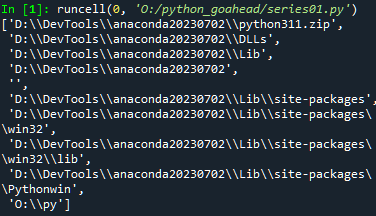
import sysimport pprintpprint.pprint(sys.path)
虽然放在这里显示的任何一个位置中都可行,但目录site-packages是最佳的选择,因为它就是用来放置模块的。
告诉解释器去哪里找
要告诉解释器到哪里去查找模块,办法之一是直接修改sys.path,但这种做法不常见。标准做法是将模块所在的目录包含在环境变量PYTHONPATH中。环境变量PYTHONPATH的内容随操作系统而异
包
为组织模块,可将其编组为包(package)。包其实就是另一种模块,但有趣的是它们可包含其他模块。模块存储在扩展名为.py的文件中,而包则是一个目录。要被Python视为包,目录必须包含文件__init__.py。如果像普通模块一样导入包,文件__init__.py的内容就将是包的内容。
要将模块加入包中,只需将模块文件放在包目录中即可。你还可以在包中嵌套其他包。
探索模块
1
2
3
4
5
6
7
8
9
10
11
12
13
14
15
16
17
18
19
20
21
22
23
24
25
26
27
28
29
import copyimport mathimport pprintpprint.pprint([n for n in dir (math) if not n.startswith('_' )]) print (copy.__all__)help (copy)print (copy.__doc__)print (copy.copy.__doc__)print (copy.__file__)
一些标准库
在Python中,短语“开箱即用”(batteries included)最初是由Frank Stajano提出的,指的是Python丰富的标准库。
sys
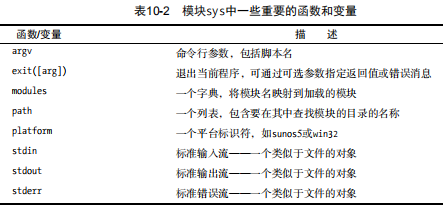
模块sys让你能够访问与Python解释器紧密相关的变量和函数
1
2
import sysprint (sys.argv)
os
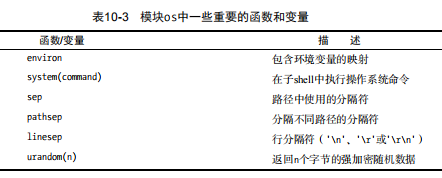
模块os让你能够访问多个操作系统服务
1
2
3
4
5
6
7
8
import osos.startfile(r'D:\DevTools\Microsoft VS Code\Code.exe' ) import webbrowserwebbrowser.open ('https://www.slacr.site' )
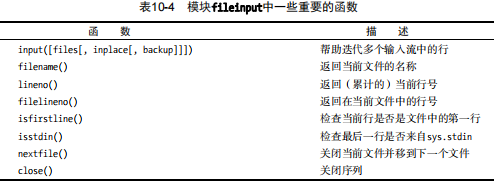
模块fileinput让你能够轻松地迭代一系列文本文件中的所有行。
1 2 3 4 5 6 7 8 9 import fileinput for line in fileinput.input (inplace=True ): line = line.rstrip() num = fileinput.lineno() print ('{:<50} # {:2d}' .format (line, num))
集合、堆和双端队列
集合
set
1 2 3 4 5 6 7 8 9 10 11 12 13 14 15 16 17 18 19 20 21 a = {1 , 2 , 3 } b = {2 , 3 , 4 } a.union(b) a | b a - b a & b a.symmetric_difference(b) a.add(frozenset (b)) a a.add((1 , 2 )) a
堆
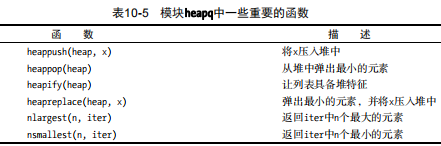
1 2 3 4 5 6 7 8 9 10 11 12 13 14 15 16 17 18 19 20 21 22 from heapq import *from random import shuffledata = list (range (10 )) shuffle(data) heap = [] for n in data: heappush(heap, n) heap heappop(heap) heappop(heap) heap heapreplace(heap, 100 ) heap ls = nlargest(3 , heap) ls
位置i处的元素总是大于位置i // 2处的元素(反过来说就是小于位置2 * i和2 * i + 1处的元素)。这是底层堆算法的基础,称为堆特征(heap property)。
函数heappop弹出最小的元素(总是位于索引0处),并确保剩余元素中最小的那个位于索引0处(保持堆特征)。
双端队列
在模块collections中,包含类型deque以及其他几个集合(collection)类型
1 2 3 4 5 6 7 8 9 10 11 12 13 14 15 16 17 from collections import dequeq = deque(range (5 )) q.append(5 ) q q.appendleft(-1 ) q q.pop() q.popleft() q q.rotate(1 ) q q.rotate(-1 ) q q.extendleft([8 ,9 ]) q
time
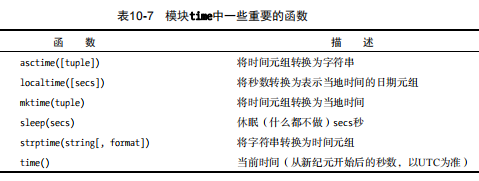
还有两个较新的与时间相关的模块:datetime和timeit。前者提供了日期和时间算术支持,而后者可帮助你计算代码段的执行时间。
random
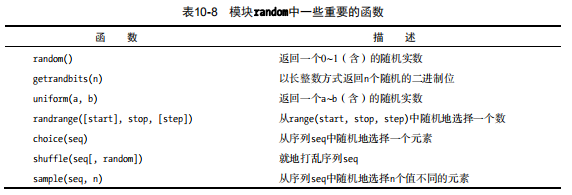
1 2 3 4 5 6 7 8 9 import randomimport fileinputfortunes = list (fileinput.input ()) print (random.choice(fortunes))
1 2 3 4 5 6 7 8 9 10 11 12 13 14 15 16 17 18 19 20 21 22 23 24 25 26 27 28 29 30 from random import randrangefrom random import *from time import *date1 = (2016 , 1 , 1 , 0 , 0 , 0 , -1 , -1 , -1 ) date2 = (2017 , 1 , 1 , 0 , 0 , 0 , -1 , -1 , -1 ) time1 = mktime(date1) time2 = mktime(date2) random_time = uniform(time1, time2) print (asctime(localtime(random_time)))num = int (input ('How many dice? ' )) sides = int (input ('How many sides per die? ' )) sum = 0 for i in range (num): sum += randrange(sides) + 1 print ('The result is' , sum )s = input ("please input a num\n" ) x = list (map (int , s)) print (x)
1 2 3 4 5 6 7 8 9 10 import randomvalues = list (range (1 , 11 )) + 'Jack Queen King' .split() suits = 'diamonds clubs hearts spades' .split() deck = ['{} of {}' .format (v, s) for v in values for s in suits] random.shuffle(deck) while deck: input (deck.pop())
shelve json
1 2 3 4 5 6 7 8 9 10 11 12 13 14 15 16 17 18 19 20 21 22 23 24 25 26 27 28 29 30 31 32 33 34 35 36 37 38 39 40 41 42 43 44 45 46 47 48 49 50 51 52 53 54 55 56 57 58 with open ("file.txt" , "r" ) as f: import sysimport shelvedef store_person (db ): pid = input ('Enput unique ID: ' ) person = {} person['name' ] = input ('Enter name: ' ) person['age' ] = input ('Enter age: ' ) person['phone' ] = input ('Enter phone: ' ) db[pid] = person def lookup_person (db ): pid = input ("Enter ID: " ) field = input ('What would you like to know?(name ,age, phone): ' ) field = field.strip().lower() print (field.capitalize() + ':' , db[pid][field]) def print_help (): print ('The available commands are:' ) print ('store : Stores information about a person' ) print ('lookup : Looks up a person from ID number' ) print ('quit : Save changes and exit' ) print ('? : Prints this message' ) def enter_command (): cmd = input ('Enter command (? for help): ' ) cmd = cmd.strip().lower() return cmd def main (): database = shelve.open ('./database.dat' ) try : while True : cmd = enter_command() if cmd == 'store' : store_person(database) elif cmd == 'lookup' : lookup_person(database) elif cmd == '?' : print_help() elif cmd == 'quit' : return finally : database.close() if __name__ == '__main__' : main()
关于上下文管理器
上下文管理器(Context Manager)是在 Python 中用于管理资源的一种机制。它提供了一种在进入和离开特定上下文时自动执行特定代码的方式。
跟java中try with resources 作用很像
上下文管理器通常使用 with 语句进行调用,其语法如下:
上下文表达式是一个返回上下文管理器对象的表达式,可以是一个类的实例或者一个函数的调用。上下文管理器对象必须实现 enter () 和 exit () 方法。
在进入 with 代码块之前,会调用上下文管理器对象的 enter () 方法,以准备资源或设置环境。在离开 with 代码块时,无论是正常退出还是发生异常,都会调用上下文管理器对象的 exit () 方法,以进行资源清理或异常处理。
通过使用上下文管理器,可以确保资源的正确获取和释放,避免资源泄漏和错误处理的问题。常见的使用上下文管理器的场景包括文件操作、数据库连接、线程锁的使用等。
上面的代码可以优化为:
1 2 3 4 5 6 7 8 9 10 11 12 13 def main (): with shelve.open ('./database.dat' ) as database: while True : cmd = enter_command() if cmd == 'store' : store_person(database) elif cmd == 'lookup' : lookup_person(database) elif cmd == '?' : print_help() elif cmd == 'quit' : return
Fluent Python python核心编程 python基础教程第三版 Python Packaging