文件
打开文件
1
2
3
4
5
6
7
8
9
|
f = open('dairy.txt', 'w')
f1 = open('dairy1.txt', 'x')
|
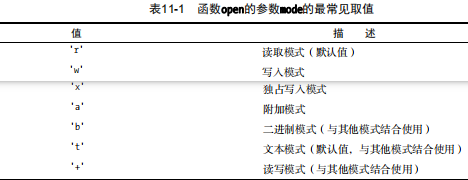
默认模式为’rt’,这意味着将把文件视为经过编码的Unicode文本,因此将自动执行解码和编码,且默认使用UTF-8编码。要指定其他编码和Unicode错误处理策略,可使用关键字参数encoding和errors。默认情况下,行以’\n’结尾。读取时将自动替换其他行尾字符(‘\r’或’\r\n’);写入时将’\n’替换为系统的默认行尾字符(os.linesep)。
文件基本方法
1
2
3
4
5
6
7
8
9
|
with open('dairy.txt', 'w') as f:
f.write("真是寂寞如雪啊~")
with open('dairy.txt', 'r') as f:
ctx = f.readline()
print(ctx)
|
管道重定向
三个标准流: sys.stdin, sys.stdout, sys.stderr
1
2
3
4
5
6
7
8
9
|
import sys
text = sys.stdin.read()
words = text.split()
wordcount = len(words)
print('Wordcount:', wordcount)
|
随机存取
seek 和 tell
1
2
3
4
5
6
7
8
9
10
11
12
13
14
|
with open('./dairy.txt', 'w+') as f:
f.seek(5)
print(f.tell())
f.write("test")
print(f.tell())
with open('./dairy.txt', 'r+') as f:
f.seek(5)
s = f.read(4)
print(s)
|
可使用方法read并不提供任何参数(将整个文件读取到一个字符串中),readlines(将文件读取到一个字符串列表中,其中每个字符串都是一行)
一些迭代
1
2
3
| import fileinput
for line in fileinput.input(filename):
process(line)
|
1
2
3
4
5
6
7
8
9
10
11
12
13
14
15
16
17
18
19
20
21
22
23
24
25
26
27
28
29
30
31
32
33
34
35
36
37
38
39
40
41
42
43
44
45
46
47
| with open(filename) as f:
char = f.read(1)
while char:
process(char)
char = f.read(1)
with open(filename) as f:
while True:
char = f.read(1)
if not char: break
process(char)
with open(filename) as f:
while True:
line = f.readline()
if not line: break
process(line)
with open(filename) as f:
for char in f.read():
process(char)
with open(filename) as f:
for line in f.readlines():
process(line)
with open(filename) as f:
for line in f:
process(line)
for line in open(filename):
process(line)
import sys
for line in sys.stdin:
process(line)
|
1
2
3
4
5
6
7
8
9
10
11
12
|
import sys
f = open('./content.txt', 'w')
print('First', file=f)
print('Second', file=f)
print('Thrid', file=f)
f.close()
with open('./content.txt') as f:
print(list(f))
|
- Fluent Python
- python核心编程
- python基础教程第三版
- Python Packaging
